 By Poko ツ
On this page
- The rule underneath every CS2 trade scam
- "Sign in through Steam": OpenID, OAuth and the fake pop-up
- What really happens when you click "Sign in through Steam"
- Why it's OpenID 2.0, not OAuth (and why everyone says OAuth anyway)
- When a site asks for your password
- Fake pop-ups: browser-in-the-browser phishing
- The Steam Guard app and the QR-code login trick
- The Steam API key scam (trade hijacking)
- The trade reversal scam: when Trade Protection is used against you
- How Trade Protection works
- How scammers abuse it
- What this means on the SkinWeb forum
- Impersonation: fake friends, cloned profiles and fake middlemen
- "Vote for my team" and fake tournament sites
- Discord "free skins" and gift messages
- Fake trading sites and fake inspect links
- Quick-swap scams: lookalike items, wear and float
- Safe-trade checklist
- Got scammed? The first hour
- FAQ
Almost nobody loses a knife because a hacker broke Steam. CS2 trade scams in 2026 work on the person, not the platform: a password typed into a window that only looks like Steam, a QR code scanned on a "vote" page, a confirmation tapped on an offer that is not the one you agreed to. Valve's systems mostly did their job. The owner just signed off on the theft.
Below is how the common ones work under the hood, and the specific check that stops each. A few are explained wrongly almost everywhere online, so we spend time on the mechanics where it matters.
The rule underneath every CS2 trade scam
Two things guard your inventory: your login (password plus Steam Guard) and your confirmation tap in the Steam mobile app. Every scam here is after one of them, or talks you into trading for something that can't sit in the trade window, like a PayPal payment. Valve's Scam FAQ already says never to do that, and since July 2025 there is a sharper reason, which we get to in the trade reversal section.
"Sign in through Steam": OpenID, OAuth and the fake pop-up
What really happens when you click "Sign in through Steam"
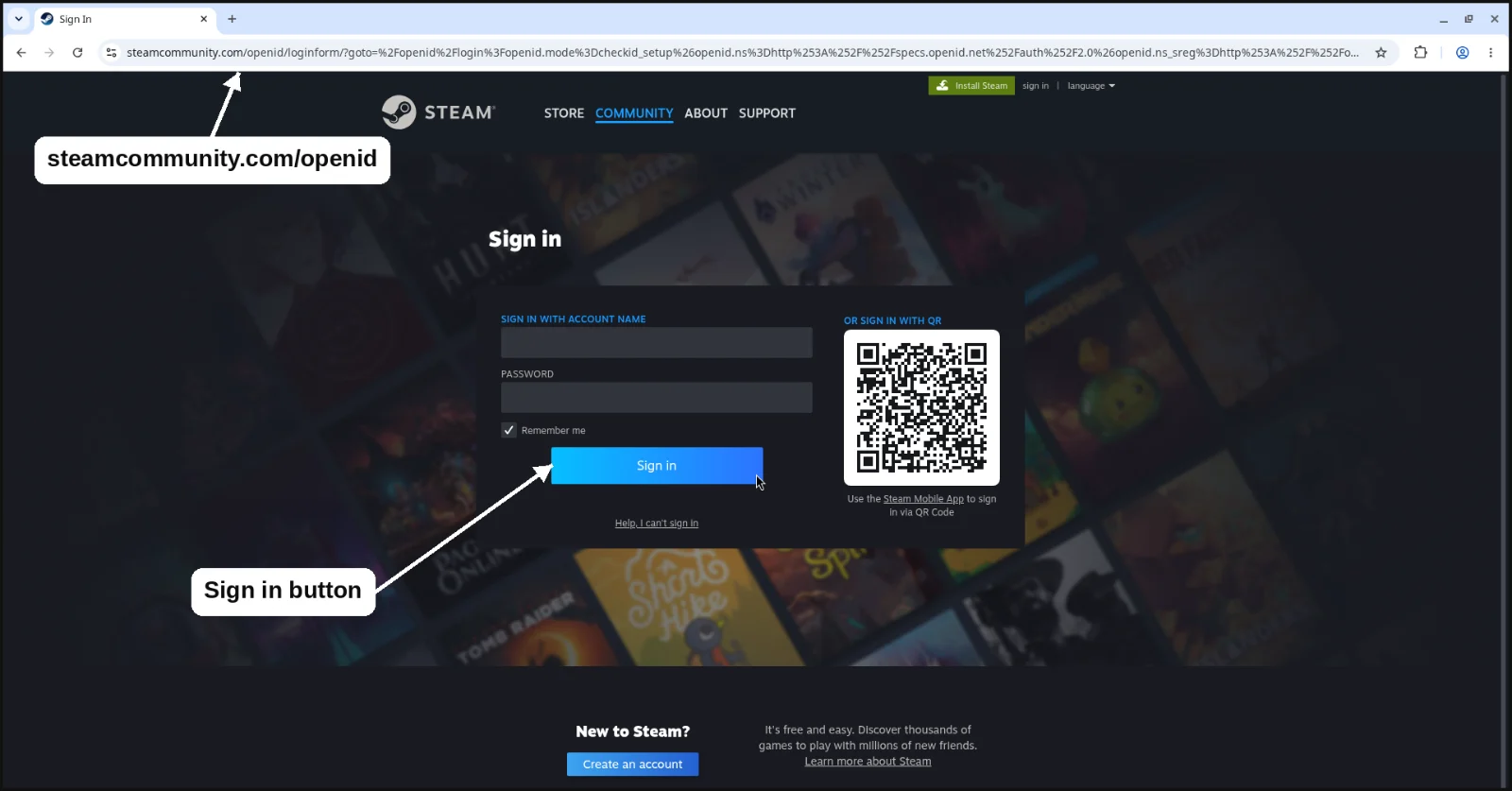
On a legitimate site, the "Sign in through Steam" button does not open a login form that belongs to the site. It sends your browser to Steam itself, to an address starting with https://steamcommunity.com/openid/. You sign in there, on Valve's page, or just click Sign in if you are already logged in to Steam in that browser. Steam then sends you back with a signed message that says, in effect, "this visitor owns SteamID 7656119...".
That number is all the site receives. A SteamID is public; anyone can read yours off your profile. It lets the site show your avatar and, if your inventory is public, list your items. It does not let the site log in as you, send trades or confirm anything. Your password never touches the site's servers.
Valve is blunt about this. The Steam Web API page describes Steam as an OpenID provider so sites can confirm who you are without you entering your Steam username or password on their site, and says asking for those would break the API Terms of Use. Put simply: a site that wants your Steam password in its own form is already breaking Valve's rules.
SkinWeb's own sign-in works exactly like this. The button hands you over to steamcommunity.com/openid, you approve on Valve's page, and Steam sends you back to us with your SteamID. Next time you sign in anywhere, watch the real address bar make that round trip. Once you have seen the genuine flow, a fake one starts to look wrong.
Why it's OpenID 2.0, not OAuth (and why everyone says OAuth anyway)
You will see this flow called "Steam OAuth" in forum posts and even developer tutorials. Strictly, it isn't. Valve's Steamworks authentication docs describe Steam as an OpenID provider under the OpenID 2.0 specification, the older standard, not the OpenID Connect that Google uses today. The two answer different questions. OpenID asks "who is this person?" OAuth asks "what may this app do on this person's behalf?" Steam's third-party sign-in only proves identity and grants the site no permissions on your account. People say OAuth because most "sign in with" buttons elsewhere are OAuth-based, and the habit stuck.
When a site asks for your password
Compare that with a site that shows its own username and password boxes, or a "login window" it drew itself. Whatever you type goes to whoever runs the page. If it then asks for your Steam Guard code as well, and good fakes always do, the operator can use both on the spot to open a live session in your account. Valve's Scam FAQ counts exactly this as hijacking. Bitdefender documented Steam phishing kits in 2022 that collected the password, then the Steam Guard code, and sent both to the attackers.
Fake pop-ups: browser-in-the-browser phishing
This is where "just check the URL" falls apart. In a browser-in-the-browser attack, a technique researcher mr.d0x published in March 2022, the pop-up is not a window at all. It is part of the scam page, drawn to look like a separate browser window, with a fake title bar, a fake address bar reading steamcommunity.com and a fake padlock. Bitdefender reported a Steam campaign built on fake tournament sites in 2022, and in March 2025 Silent Push and BleepingComputer covered fake "free case" sites aimed at CS2 players.
So the question is not whether it says steamcommunity.com, but where it says it. These checks hold up:
- Drag it. Pull the pop-up's title bar past the edge of your browser. A real pop-up is its own window and goes where you drag it. A fake one is stuck inside the page and gets clipped.
- Look for it in your taskbar or Alt-Tab (Mission Control on a Mac). A real window shows up there; a drawn one does not.
- Read the real address bar at the very top of your browser. In a genuine Steam sign-in, either the whole tab moves to https://steamcommunity.com/openid/... or a real new window opens with its own working bar. Check the domain letter by letter and click the padlock to see who the certificate belongs to.
- Watch your password manager. It fills logins based on the page's real domain, so on a phishing domain it normally stays quiet. A hint, not proof: maybe you never saved your Steam login.
A habit that helps: open Steam yourself from a bookmark and sign in there first. A real "Sign in through Steam" in that browser should then show a Sign in button for your account rather than a password box. Cookies expire, so a password prompt isn't proof of a fake, but it is a reason to stop and look.
The Steam Guard app and the QR-code login trick
The Steam Guard Mobile Authenticator is why trades need a tap on your phone. Valve's Item Restoration Policy says accounts without it get trades and Market listings held for 15 days. CS2 items are now the exception: Valve's Trade Protection FAQ says they move instantly whatever security the account has. Either way, that tap is all that stands between your inventory and someone holding your session.
Since version 3.0 of the Steam mobile app in October 2022, you can sign in on a browser by scanning a QR code with the app. Scammers open the real Steam login page on their own machine, copy its QR code onto a fake voting page, giveaway or tournament stream, and wait. You scan, approve, and their browser is now signed in to your account. No password needed. In February 2025 BleepingComputer reported fake CS2 tournament streams on YouTube using QR codes and links to push viewers to fake Steam logins.
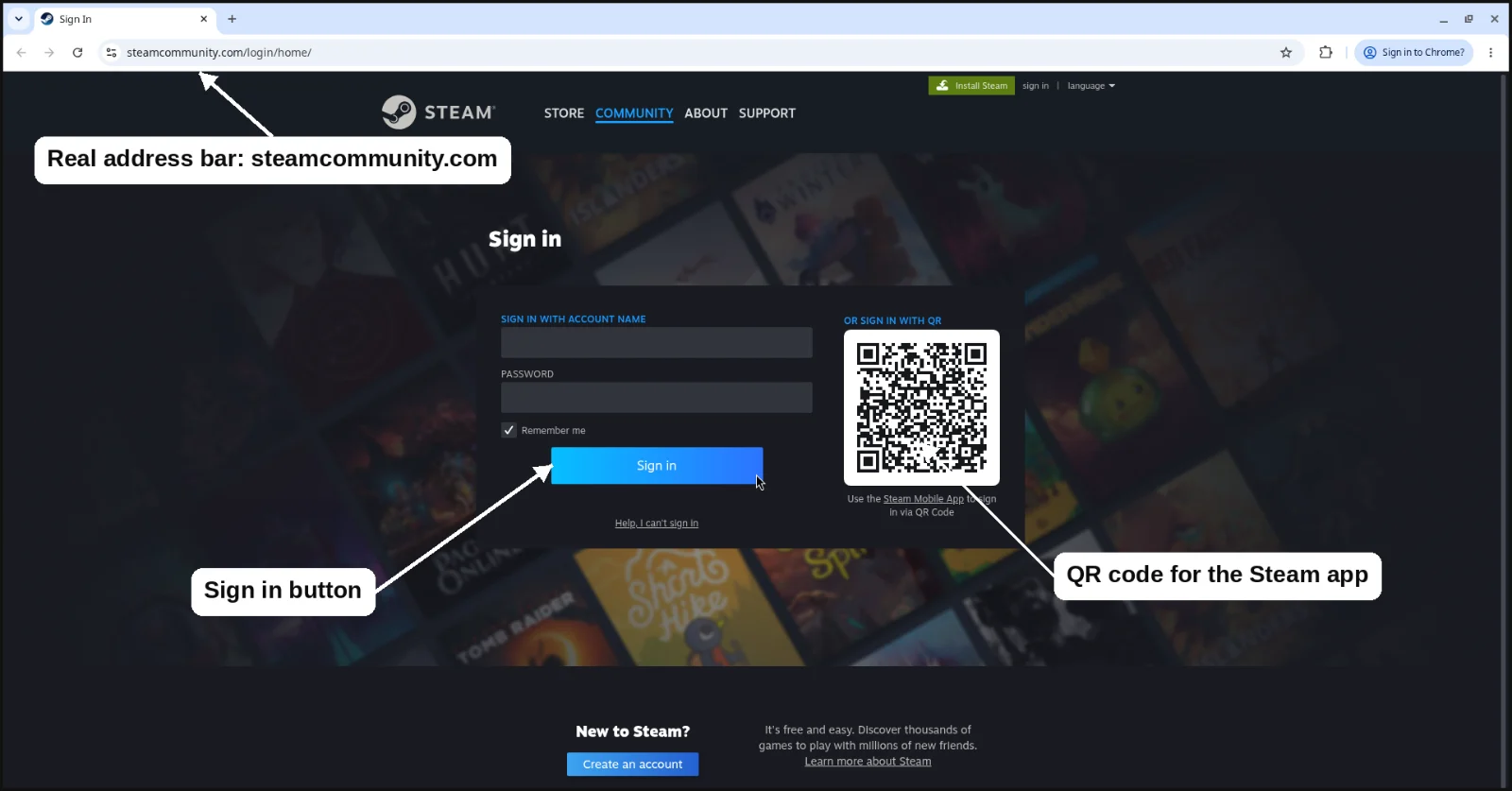
Only scan a Steam QR code on a login page you opened yourself, on your own screen, and read the location the app shows before approving. A sign-in request you didn't start gets denied, followed by a password change.
The Steam API key scam (trade hijacking)
Most guides still describe the 2019-era version of this scam, where the API key alone cancels and sends your trades. In 2026 the key is the smaller half. The damage comes from a stolen login session.
- You log in on a phishing site, often through a fake pop-up. The attacker now has a live session in your account.
- They create a Steam Web API key on it, which lets their bot see your trade offers the moment they appear.
- You send or accept a real offer, say to a marketplace bot or a forum trader.
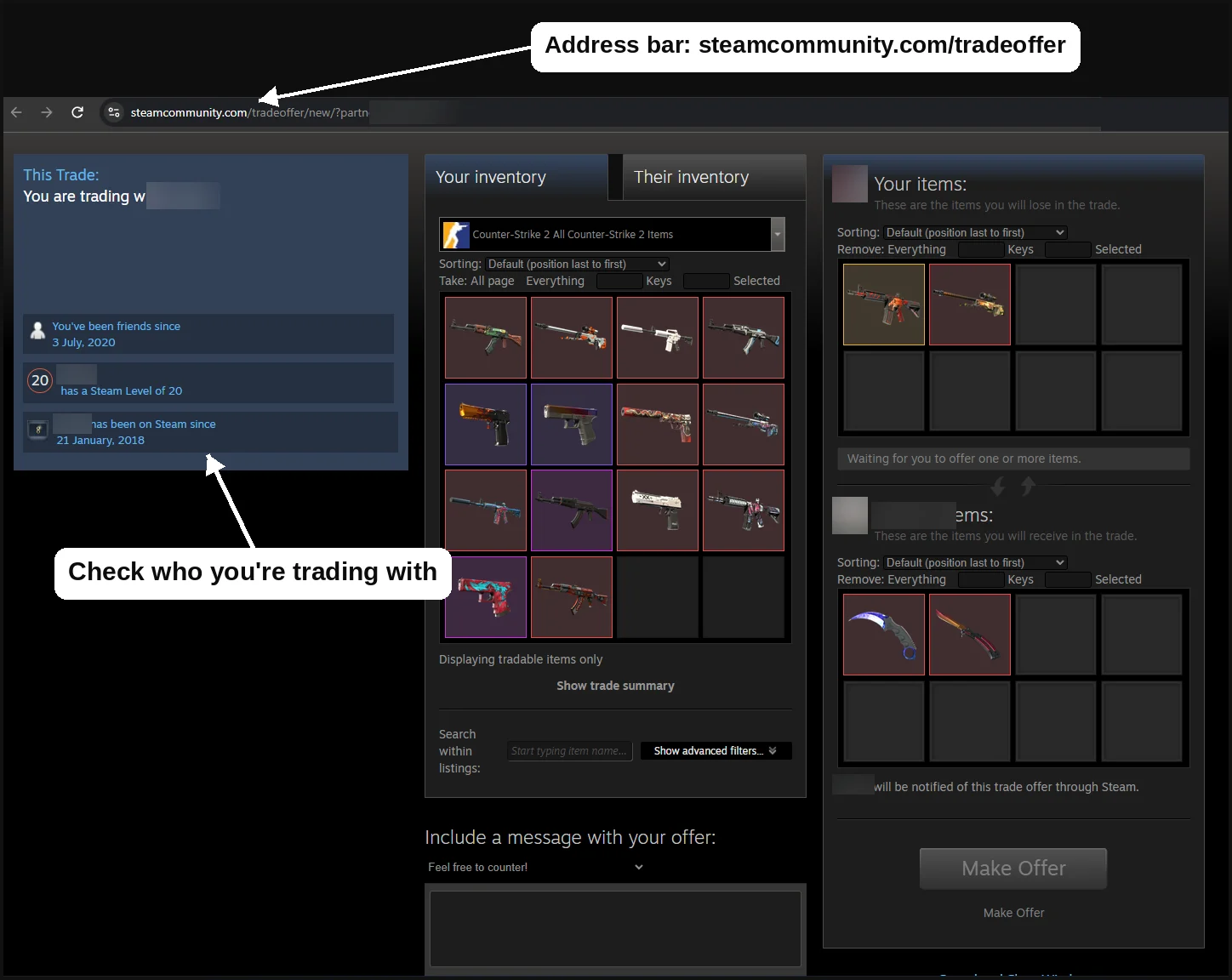
- Using your session, they cancel it and instantly send a near-identical offer to a lookalike account with the same name and avatar, usually a fresh /profiles/7656... account.
- You confirm in the app because it looks like your trade. The items go to the scammer.
According to traders and developers, Valve stopped allowing trade offers to be cancelled through the Web API a few years ago, which is why the session does the real work. We found no Valve statement spelling out which calls changed, but the advice from every serious source is the same: revoking the key alone is not enough.
Valve did close one door. Since December 2023, creating a Web API key needs approval in the Steam mobile app, per the changelog of the widely used node-steamcommunity library and Steam forum users. So an unexpected request on your phone to approve an API key means someone is already in your account. Deny it. Many traders also report a scam warning in the app when you confirm items from a recently cancelled offer. Read it.
Protect yourself: after signing in to any new site, check steamcommunity.com/dev/apikey. Most traders never need a key, so one you didn't create means the account is compromised. Before confirming, open the partner's profile from the confirmation and compare the SteamID64, level and "member since" date with the person you expect. Steam community guides note that removing and re-adding the authenticator triggers a 15-day hold. CS2 trades now skip holds, but other items and Market listings may not, so save that for when you really need it.
The trade reversal scam: when Trade Protection is used against you
How Trade Protection works
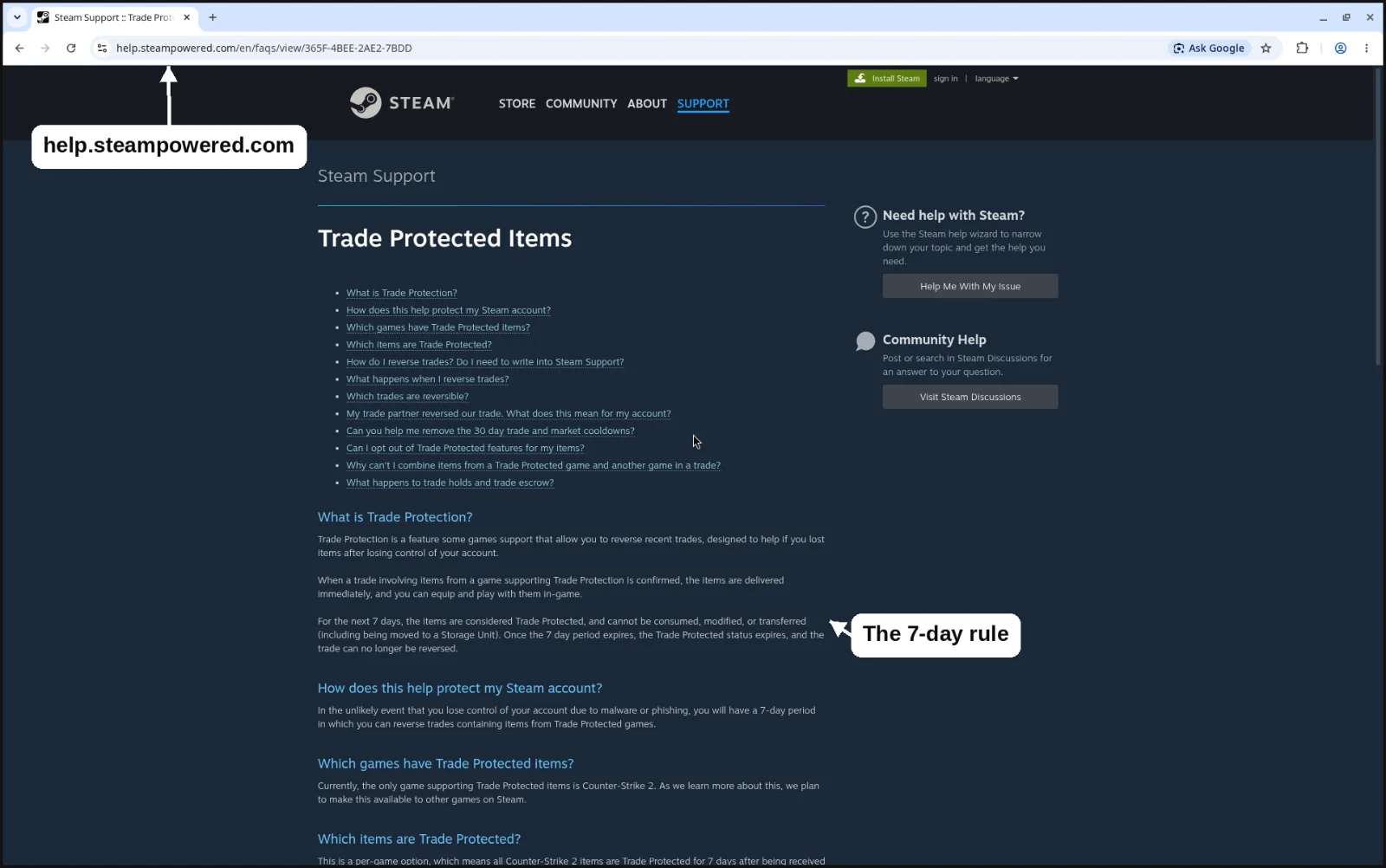
Valve added Trade Protection to CS2 on 15 July 2025, in the update that started Premier Season Three. Per Valve's Trade Protected Items FAQ, checked 17 Oct 2026:
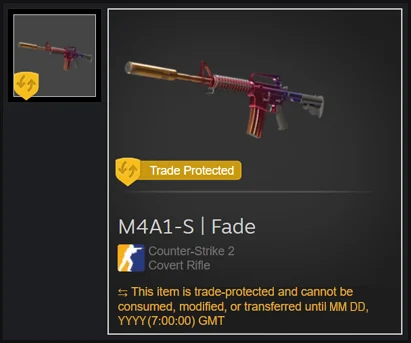
- Traded items arrive immediately and can be used in game, but for 7 days they are Trade Protected: they cannot be traded on, modified, consumed or put in a Storage Unit.
- Within those 7 days the trade can be reversed from Trade History. After that it is final.
- Reversal is all or nothing. It undoes every trade with Trade Protected items that account made in the last 7 days, and items return to their previous owners.
- The account that reverses gets a 30-day trade and Market cooldown that Steam Support cannot lift. The partner gets no restriction.
- CS2 items no longer get trade holds or escrow, because of Trade Protection.
Who can reverse? Valve's FAQ is written per account, includes an entry for when your trade partner reversed a trade, and never limits it to one side. PCWorld summed it up in July 2025: either party can reverse. Guides saying only the sender can are narrower than Valve's wording.
How scammers abuse it
In a skin-for-skin trade, a reversal is annoying but fair: both sides get their own items back and the reverser sits out 30 days. The trouble is skin-for-cash. If you pay outside Steam and the skin arrives in a Steam trade, a reversal sends the skin back to the seller and nothing sends your PayPal, crypto or gift card money back. That gap is the whole scam.
- A skin is offered below market in Discord, on a forum or in DMs, for payment outside Steam.
- You pay. The skin arrives in a normal trade, wearing the yellow Trade Protected shield.
- Within 7 days the seller reverses from Trade History, takes the skin back and accepts the 30-day cooldown as the cost of the job.
- You have no skin and no money. Valve does not restore items, and the payment cannot be recalled.
To be fair to Valve, Trade Protection did not create this scam. Cash for directly traded items was always on Valve's list of things not to do. What changed is that sellers now have a reliable undo button for a week. The mirror version, a buyer who pays by PayPal and files a chargeback, is older still. Some of Valve's older help pages still say a confirmed trade can never be reversed, which stopped being true for CS2 in July 2025.
What this means on the SkinWeb forum
We want to be straight about this. The SkinWeb trade forum does not hold items, is not a middleman and does not ban cash deals; a listing can even ask for cash or crypto. Trades agreed there go through plain Steam trade offers between the two of you, so they carry Trade Protection like every other CS2 trade. A cash deal set up on our forum has exactly the same reversal risk as one set up on Discord. The forum does not protect you from it, and no forum can.
The safe options are boring. Keep it skin-for-skin, all in one Steam offer, so a reversal simply puts both inventories back. If you do a cash deal anyway, don't treat it as finished until the 7-day protection on the skin has run out, because until then the seller can take it back. That is also why many marketplaces only pay sellers after the window closes. The flip side: if your own account is stolen, that same reversal is your emergency brake.
Red flags: a below-market price with pressure to trade now, irreversible payment only, "ignore the yellow shield", or an offer to send the skin first "for trust", which costs a seller nothing when they can reverse it.
Trade skin-for-skin with other players on the free SkinWeb trade forum.
Deals go through normal Steam trade offers between you and yImpersonation: fake friends, cloned profiles and fake middlemen
Names and avatars cost nothing to copy. A clone of your friend sends an offer, a "Valve admin" wants your items sent to a verification account, or a "trusted middleman" offers to hold them and turns out to be the scammer's alt. Valve's Scam FAQ calls verification accounts a scam, says Steam trades never need a middleman, and treats the "I accidentally reported you" story as a scam every time. Check the SteamID64, not the name, and confirm odd requests with the real friend somewhere else.
"Vote for my team" and fake tournament sites
Valve has a dedicated help page for this one. A friend asks you to vote for their team, and voting needs "Sign in through Steam", which opens a fake pop-up or a QR code. Afterwards your account sends the same message to your friends. Valve says these requests are likely phishing even from a trusted friend, whose account has probably been taken. Ask them another way, and report the account as hijacked so it gets locked.
Discord "free skins" and gift messages
You "won" a case, a knife or a Steam gift, and claiming it needs a Steam login or a QR scan. Silent Push documented fake free-case sites using a famous team's branding, promoted on YouTube, in March 2025. Valve also warns about "join our team" messages pushing voice software that is really malware. If you didn't enter, you didn't win.
Fake trading sites and fake inspect links
Cloned marketplaces sit one character off the real domain, and DM'd "inventory value" pages lead to the same fake login. A real CS2 inspect link is a steam:// link that opens the item in your game client and never needs a password on a web page. Use bookmarks, and with a new site deposit a little and withdraw once before trusting it.
Quick-swap scams: lookalike items, wear and float
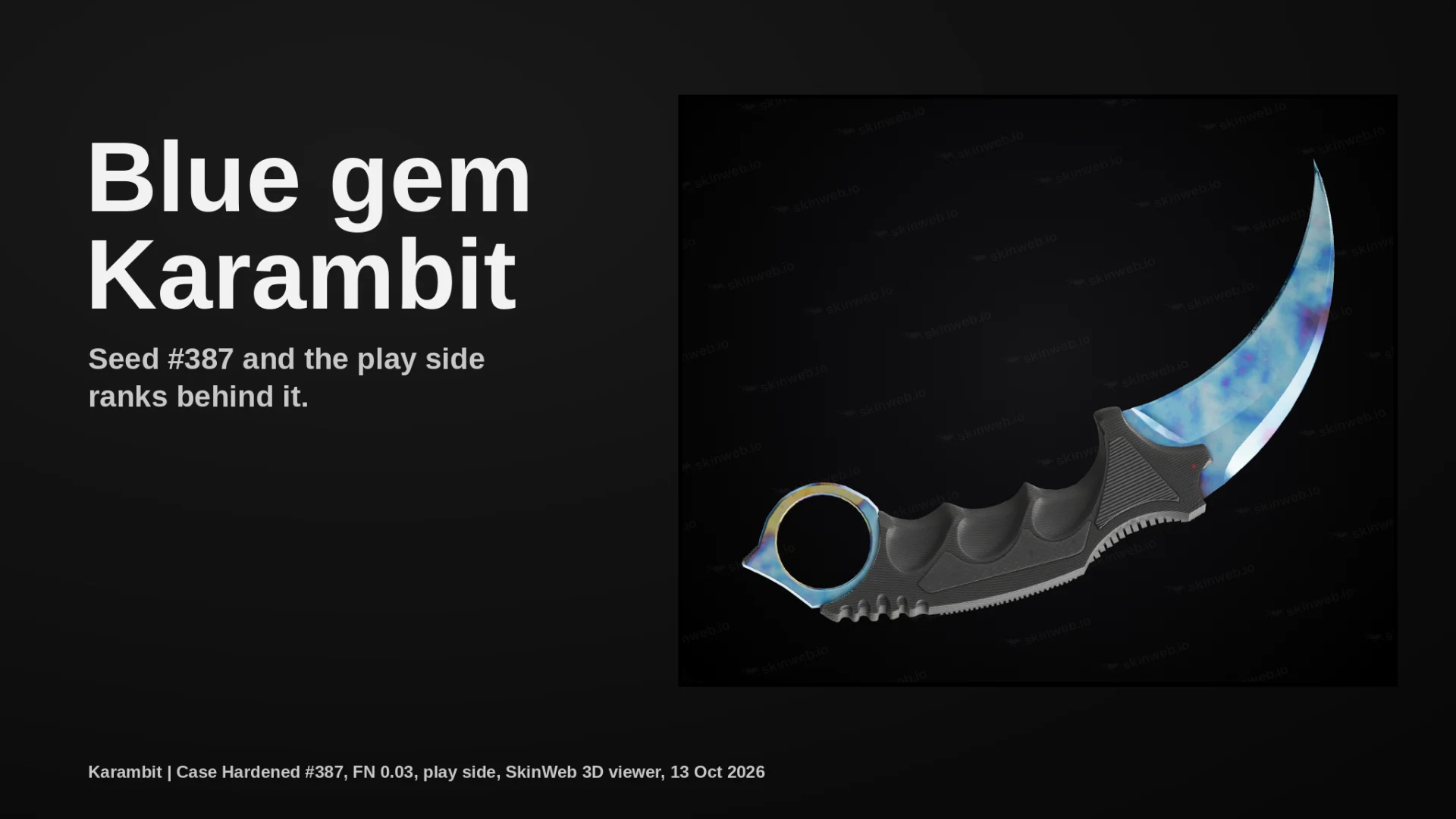
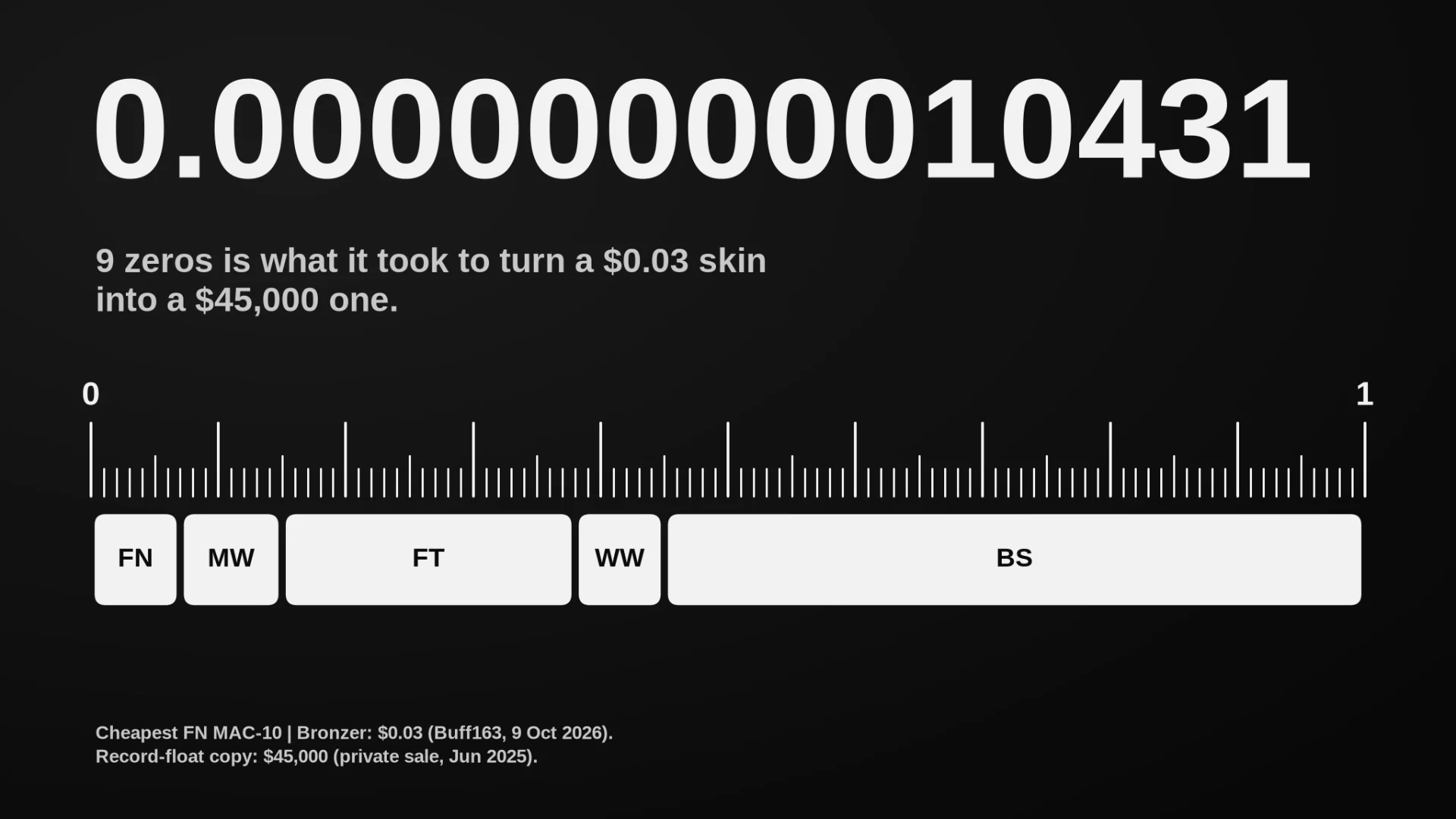
Valve's Scam FAQ covers item switching, where the offered item only looks like the agreed one, and quality switching, Field-Tested where Factory New was promised, often slipped in through a last-second counter-offer. CS2 adds subtler swaps: StatTrak for non-StatTrak, the wrong Doppler phase, a worse Case Hardened pattern, a higher float inside the same wear, or stickers scraped off. Inspect every item in the offer window, and again after any counter-offer.
Paste an item's inspect link into the SkinWeb 3D viewer to see its exact float and pattern, and check its fair price across up to 12 markets before you accept.
A price that looks too good is usually the first red flag.Safe-trade checklist
Got scammed? The first hour
- Change your password from a clean device and deauthorise all devices at store.steampowered.com/twofactor/manage. Locked out? Use Steam's account recovery.
- Revoke any Web API key.
- Generate new Steam Guard backup codes and scan your PC for malware.
- If items left in protected trades within the last 7 days, reverse from Trade History. It undoes every protected trade from that window and costs you a 30-day cooldown, but it brings the items home.
- Report the scammer's profile.
- Know the limit: Steam Support does not restore items that left your account. Never pay a "recovery service" or anyone holding your account to ransom. Valve says you can always recover the account itself through Steam Support.
Order matters. Valve's own advice is to make sure you are in control of the account before you reverse anything. Reverse while the scammer still has a session and they can lock you out, leaving the returned items in an account you no longer control. Lock the door before you go back for the furniture.
FAQ
Can a CS2 trade be reversed?
Yes, for 7 days. From your Trade History you can reverse trades involving Trade Protected items, but it is all or nothing: every protected trade your account made in the last 7 days is undone at once, and items return to their previous owners. The account that reverses is then blocked from trading and the Community Market for 30 days, and Steam Support cannot lift it.
Who can reverse a CS2 trade, the buyer or the seller?
Valve's FAQ does not limit it to one side. It is written per account and covers both reversing your own trades and a partner reversing them, and PCWorld summarised it as either party being able to reverse. That is why the trade reversal scam works: a seller paid outside Steam can pull the skin back within 7 days.
Is "Sign in through Steam" safe?
The real thing is. It sends you to steamcommunity.com/openid, you sign in on Valve's page, and the site only receives your SteamID, a public number that cannot log in, trade or confirm anything. The danger is fake copies drawn inside a page. Drag the pop-up and check your browser's real address bar.
What can someone do with my Steam API key?
On its own, a key mainly lets a bot watch your trade activity in real time. According to traders and developers, today's version of the scam pairs it with a stolen login session, and the session is what cancels and re-sends your offers. So revoke the key at steamcommunity.com/dev/apikey and also change your password and deauthorise all devices.
Will Steam give back scammed skins?
No. Valve's Item Restoration Policy says Steam Support does not restore items that leave an account. Your one real undo is reversing your own Trade Protected trades within 7 days, after securing your account. Ignore anyone who offers to "recover" items for a fee, because that is another scam.
How do I know a Steam login pop-up is fake?
Try to drag it outside your browser. A real window moves freely and appears on your taskbar or in Alt-Tab; a fake one is stuck inside the page. Read the address bar at the very top of your real browser, not the one inside the pop-up. A silent password manager is a warning sign too, though not proof.
Is it safe to buy CS2 skins with PayPal or crypto from another player?
Not if the skin comes in a direct Steam trade. The seller can reverse the trade for 7 days and get the skin back, while your payment stays gone. That is the trade reversal scam. Trade skin-for-skin, or do not treat a cash deal as done until the 7-day protection window has ended.
What should I do if I clicked a phishing link?
If you only opened it and typed nothing, close it and make sure nothing downloaded. If you entered your password or scanned a QR code, act now: change your password from a clean device, deauthorise all devices, revoke any API key, make new backup codes, then reverse protected trades from the last 7 days if items left.
Before your next trade, check the going rate in the SkinWeb price comparison, look at the exact float and pattern in the 3D viewer, and keep the deal in a single Steam offer. If someone fights you on any of those, you have your answer.
Find your next trade on the free SkinWeb trade forum.
Plain Steam trade offers, no middlemen, and we never hold yo